

Where the setting lives
There are three places to set a version, and they layer:- Client → MCP Protocol — the host default applied to every server attached to that Client.
- Add Server modal → Connection overrides → Protocol version — a per-server override set at add time (available when adding a server to a shared project).
- Server card → Edit → Advanced settings → Protocol version — a per-server override that wins over the host default.
Available versions
The 2026 RC applies the stateless model across transports. MCPJam’s initial preview client is narrower: it currently supports the RC over Streamable HTTP POST. The per-server dropdown hides the RC option for STDIO and legacy SSE servers; if a host-level RC default reaches a non-HTTP server, the inspector fails the connection with a clear transport error instead of silently attempting the wrong protocol.
Setting the host default
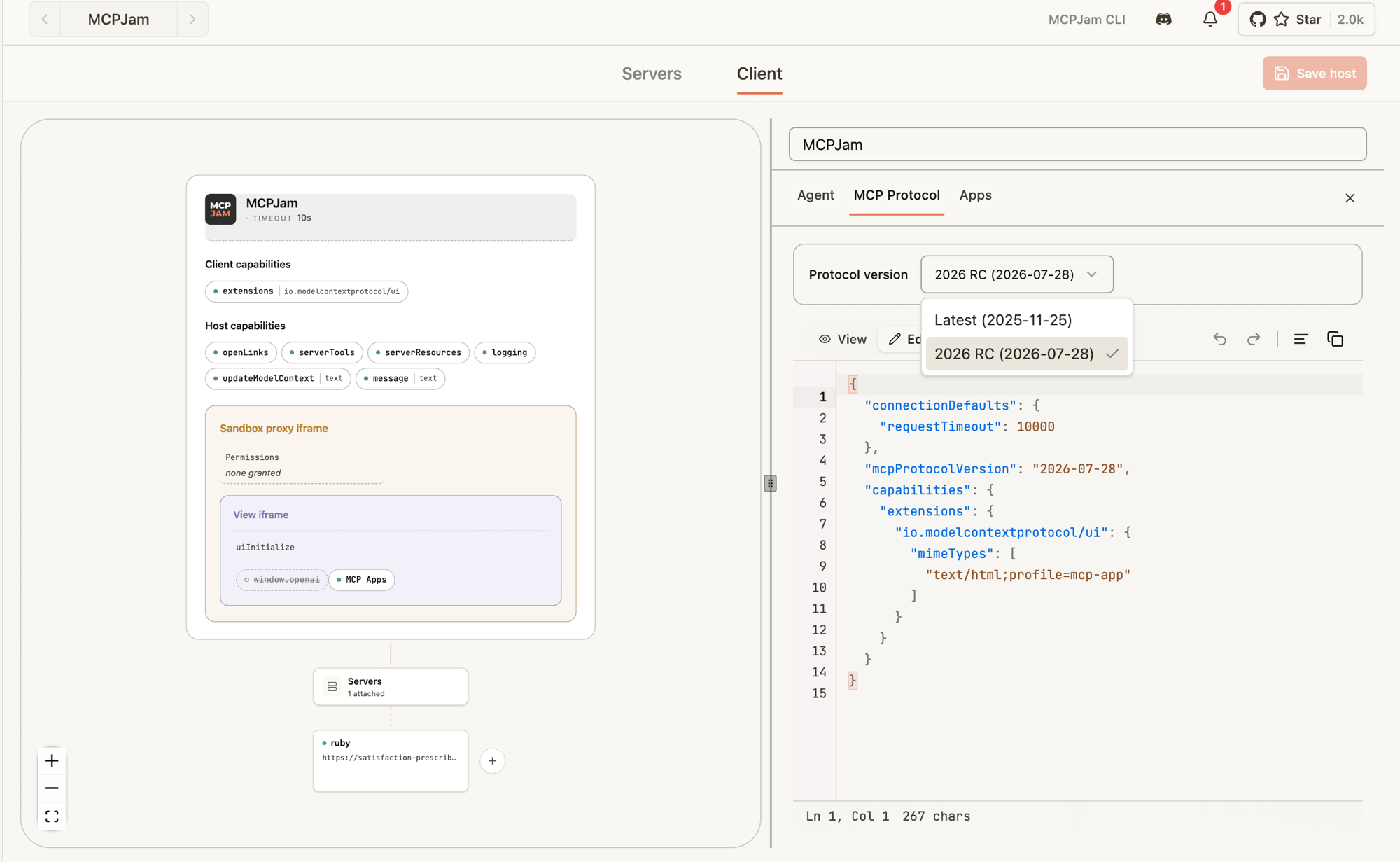
- Open the Clients tab.
- Pick the Client you want to edit (or create a new one).
- Open the MCP Protocol tab.
- In the Protocol version dropdown, pick Latest or 2026 RC (2026-07-28).
- Save.
Overriding a single server
You can set the per-server protocol version either when adding a server or when editing an existing one.At add time (shared projects)
When adding a server to a shared project, the Connection overrides section of the Add Server modal includes a Protocol version picker. The 2026 RC option is only shown for HTTP servers.- Click Add server in the Servers tab.
- Fill in the server details.
- Expand Connection overrides.
- Pick Client default, Latest (2025-11-25), or 2026 RC (2026-07-28) from the Protocol version dropdown.
- Submit the form.
After adding (edit flow)
- Go to the Servers tab.
- Click the three dots on the server card → Edit (or open View server info → Edit).
- Expand Advanced settings.
- Find Protocol version and pick Host default, Latest (2025-11-25), or 2026 RC (2026-07-28).
- Save and reconnect the server.
What changes when you pick the 2026 RC
If your server already speaks2026-07-28, you mostly won’t notice. A few things to know when you’re testing:
- No
initializehandshake. The inspector connects, immediately firesserver/discover, and uses the result to populate the server card’s name, version, capabilities, and instructions. - Per-request metadata. Every request the inspector sends carries
MCP-Protocol-Version: 2026-07-28as an HTTP header and the same value insideparams._meta["io.modelcontextprotocol/protocolVersion"].clientInfoandclientCapabilitiesride along on every request too. - No session IDs. The inspector never sends an
mcp-session-id. If your server returns one, the inspector discards it and surfaces a warning — your server isn’t conforming to the stateless RC. - Cancellation is closing the stream. For SSE responses, the inspector closes the response stream to cancel; your server should treat that as a cancel signal.
What the inspector tells you
- If your server doesn’t speak
2026-07-28,server/discoverreturns-32004 UnsupportedProtocolVersionErrorand the connection fails with the supported-versions list visible in the Activity log. - If your server is missing a capability the inspector needs for a request, you’ll get
-32003 MissingRequiredClientCapabilityback from your server — surface those in the Activity log to confirm they reach you. - The Activity log (server card → Activity) is the source of truth — every request and response, success or error, lands there so you can verify headers and
_metacontent.
Not yet supported in the RC client
The 2026 RC client is a preview. A handful of pieces from the SEP family aren’t wired up yet — if you try them, the inspector throws a labeled error instead of silently no-op’ing:subscriptions/listen(long-lived notification stream)- Server-initiated requests via MRTR /
InputRequiredResult(sampling, elicitation, listRoots embedded in responses) - Resumption tokens
- Backward-compat probes against pre-RC servers — if you point the RC client at an
initialize-only server it will fail atserver/discover, not fall back.
tools/list, tools/call, resources/*, prompts/*, OAuth refresh, custom headers, progress notifications — the RC client behaves like the legacy one.
Recommended testing flow
- Build a Client called something like
2026 RC sandboxwith MCP Protocol → 2026 RC as the host default. - Attach the HTTP server you’re upgrading.
- Connect — confirm the server card shows the server info populated from
server/discover(name, version, capabilities, instructions). - Run a
tools/listand atools/callfrom the Tools tab. - Watch the Activity log for the request
_metaand theMCP-Protocol-Versionheader. - Try an unsupported version on a second test server to confirm your
-32004error envelope looks right. - Once your server is happy on the RC, keep one Client on Latest so you can flip between versions without rewriting settings.
2026-07-28, the rest fall back to Latest.
Recommended reading
Background on the 2026-07-28 RC and the stateless direction the protocol is moving in:- MCP Is Growing Up — AAIF’s overview of what the 2026-07-28 RC means for teams building agentic systems.
- 2026-07-28 release candidate announcement — the official blog post walking through what the RC changes and why.
- MCP specification (draft) — the in-progress spec text the inspector’s RC client targets.